How does TikTok know your location?


TikTok automatically collects certain information that can help determine your general location, even if you don’t tag where you are in your posts. This can include information related to your SIM card, network connection, and device characteristics. TikTok may also collect precise location data (such as GPS coordinates) if this feature is available in your region and you choose to enable location permissions on your device.
This article explains how TikTok determines your location, how you can manage location-based content preferences, and the steps you can take to control location data and enhance your privacy on the platform.
What location data does TikTok collect and why?
According to its privacy policy, TikTok may collect multiple types of location-related information, depending on your device settings and how you interact with the app. This can include:
- Your approximate location: TikTok can infer your general location from information such as your IP address, mobile carrier information, or SIM data.
- Your precise location: If you grant TikTok access to your device’s Location Services, it may collect more accurate location data, such as GPS coordinates, cell tower information, or Wi-Fi hotspot data. Availability of this feature may vary by region and device settings.
- Location information you add in content: If you tag a video with a city, shop, landmark, or another place when you post or otherwise include location metadata, TikTok will store that as part of the content data.
TikTok uses location data to provide, personalize, and improve its services. This includes tailoring content and ads based on your region, operating and securing the platform, and performing analytics. The specific types of location data collected and how it’s used can vary depending on your location and the permissions you grant.
Learn more about the data TikTok collects and how it’s used in our guide: Does TikTok spy on you?
Signals TikTok uses to determine your location
TikTok can determine your location through several key signals, including your connection details, mobile carrier, and activity on the platform.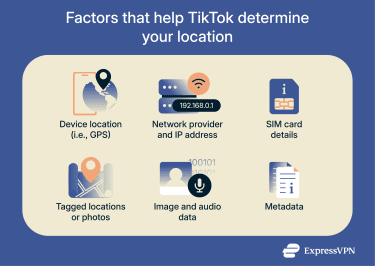
Device location services (GPS and Wi-Fi)
TikTok may collect precise location data from your device’s location services, such as GPS coordinates, cell tower information, and nearby Wi-Fi hotspots. However, TikTok can only collect this data if you grant the app permission to access it and if you’re in a particular region.
In certain locations, including the U.S., Australia, and South Korea, TikTok states that the current version of the app doesn’t collect GPS or other precise location data, regardless of permissions granted. However, if you’re in those locations but using an older app version and previously allowed location access, you may still have had GPS data collected.
TikTok categorizes location data collected through device services as “automatically collected information.” According to its privacy policy, some automatically collected data may be shared with third parties in accordance with TikTok’s data-sharing practices.
Your IP address and network details
TikTok collects your IP address, which can provide a general indication of your location, such as your city or region. This approximate location can impact your algorithm, affecting the content and ads you see in your For You feed, Nearby feed, and TikTok shop.
TikTok also assigns you a device ID and user ID so it can identify your activity across devices, even while using another network.
SIM card details
Your SIM card contains a mobile country code that indicates where your phone service is registered. TikTok uses this information as a signal to determine your region. For example, if you use a German SIM card, TikTok will often use that as a key signal to associate your account with Germany, regardless of your current physical location.
While TikTok collects some information about your SIM, it doesn't collect your SIM serial number, nor does it collect key device identifiers like your International Mobile Equipment Identity (IMEI) or Media Access Control (MAC) address.
Location data you provide
When you engage with TikTok, you might voluntarily share additional information about your location. This includes:
- Tagged locations: If you tag a specific location, such as a city or landmark, TikTok records this as part of the content and uses it to associate your content with that location.
- Image and audio details: TikTok analyzes visual elements in your content, such as objects, scenery, and facial features, to support features like video effects, moderation, and recommendations. Some of these elements could indirectly reveal information about your general location or points of interest, but TikTok’s policy does not explicitly confirm this as a use case.
- Metadata: When you create and upload content on TikTok, your videos and images generate metadata, which is technical and descriptive information linked to the content. This includes details such as the time the content was created and, importantly, the location where it was recorded if your device’s location services were enabled at the time.
Customizing your TikTok location using built-in settings
TikTok provides several tools that allow you to manage how it reads your location and adjust what appears on your feed.
Manage Location Services settings
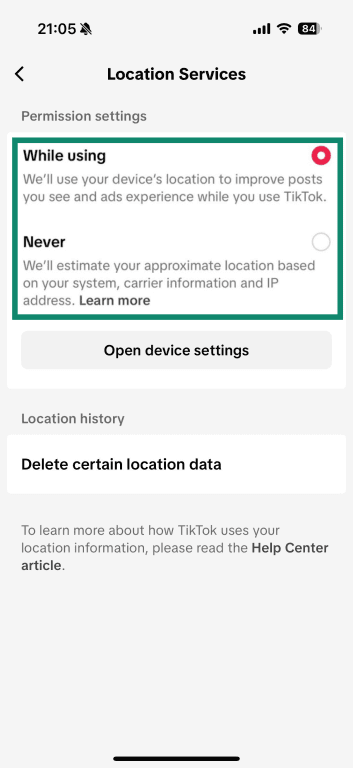
Location Services control when and how TikTok can access your device’s GPS and other location data to determine your precise location. If you disable this setting completely, the app won’t collect precise GPS data. Instead, TikTok will only estimate your approximate location based on other signals, such as your IP address and mobile carrier information.
To update your Location Services settings in the TikTok mobile app:
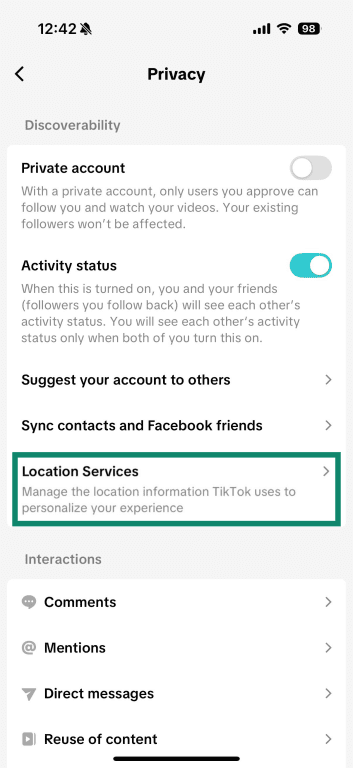
- Go to Profile, then tap the Menu (☰) icon in the top-right corner.

- Select Settings and privacy.
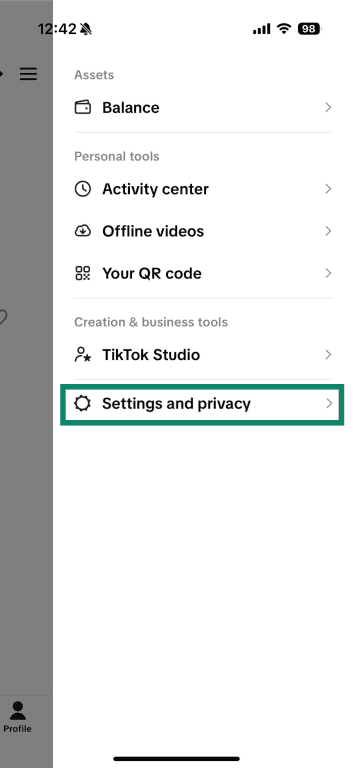
- Tap Privacy.
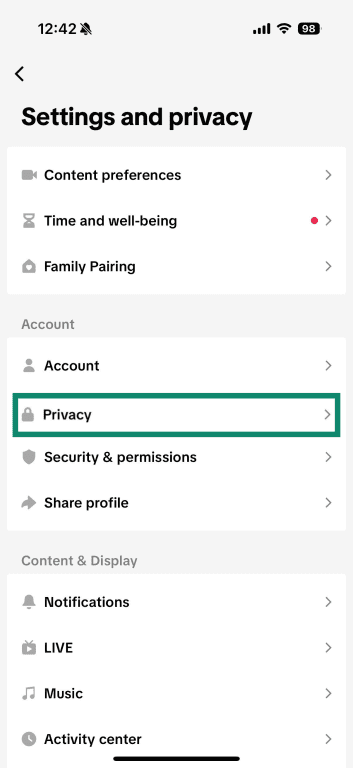
- Choose Location Services.
- Select While using or Never.
You can also clear any stored data obtained through Location Services from the same settings menu:
- Under Location history, tap Delete certain location data.

- Tap Delete to confirm your choice.
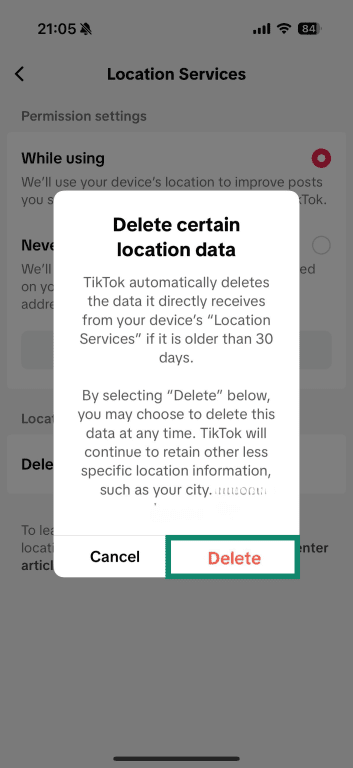
Note: Deleting this location data clears any stored precise GPS (or similar) information from the last 30 days, but TikTok continues to collect approximate location information, such as your city or region, from signals such as your IP address or mobile carrier.
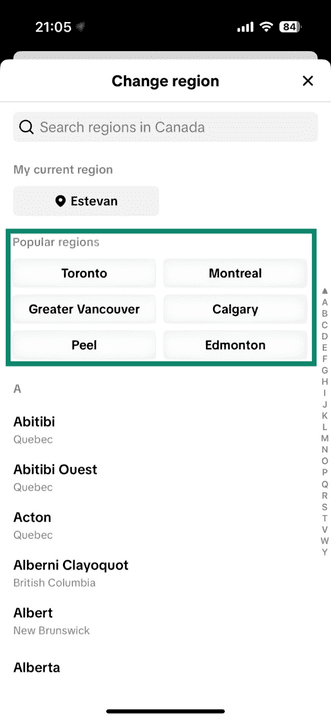
Change your Nearby feed location
The Nearby feed offers a stream of public content from creators in your region, such as local events, businesses, travel spots, or other community‑based posts. This feature is gradually being rolled out and is currently only available to users in selected locations.
You can change the region used by the Nearby feed (for example, to a different city, state, or country). Note that this only affects the content you see in that feed; it doesn’t change what data TikTok collects.
To change your Nearby feed region in the TikTok app:
- In the top menu, locate your city or region and tap the drop-down arrow next to it.
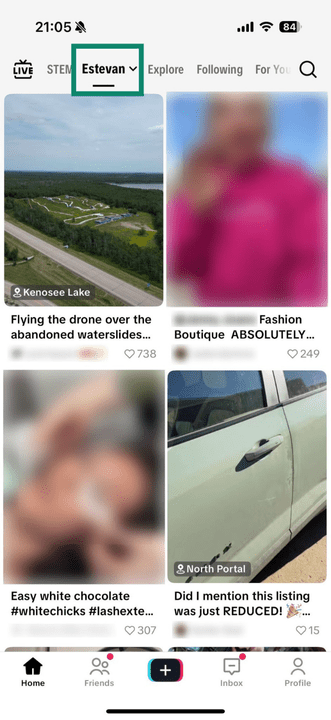
- Choose the region you want and follow the on-screen prompts to confirm.
Reset your For You feed
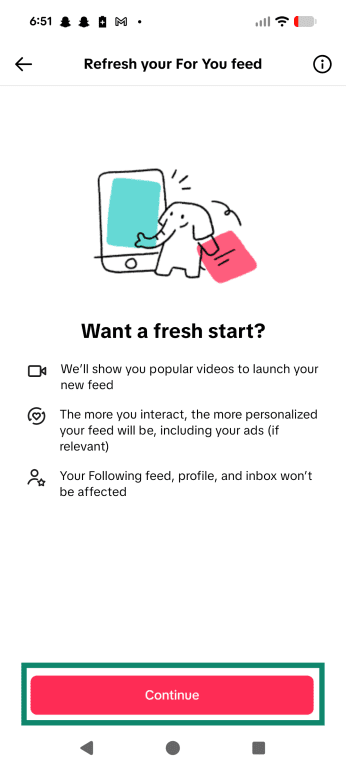
TikTok’s “Refresh your For You feed” feature clears your current recommendation profile without deleting any of your account data or history. This essentially resets your personalized feed to a neutral state.
After resetting, TikTok will build your For You feed based on your future interactions, such as the videos you watch, like, or share, along with location signals. This can help your recommendations better align with your current interests and location over time. However, this doesn’t affect the location data TikTok collects or stores about you.
To reset your feed:
- From your profile, tap the Menu (☰) icon in the top-right corner, then select Settings and privacy.
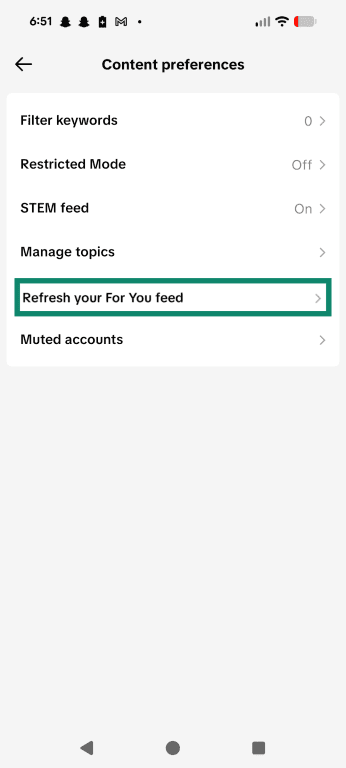
- Select Content Preferences.
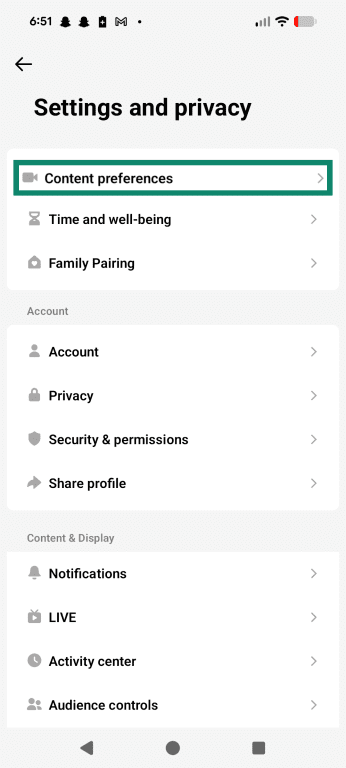
- Choose Refresh your For You feed.
- Select Continue to confirm.
Understanding location privacy on TikTok
Beyond customizing your location and content preferences, you can also protect your privacy and manage how others view your location on TikTok with a few simple settings and tools.
Using TikTok settings to protect your location from third parties
TikTok provides tools that let you control how your location and personal information are shared with other users and advertisers. While some location data is necessary for the app to function, you can take steps to limit what others can see and use.
Here are some simple ways to protect your location privacy:
- Make your account private: When your account is private, only people you approve can see your videos and profile. This means your content won’t show up publicly in places like the Nearby feed, which helps keep your location more private.
- Adjust ad settings: You can change your ad preferences to limit how TikTok uses your location and activity for personalized ads. In ad settings, toggle “Personalized ads” off and select “clear off-TikTok data” to minimize the information shared with advertisers.
- Control who can find you: By limiting who can see your phone number and email, you reduce the chance TikTok will connect your account to other profiles or suggest you to people you don’t know. This can help prevent others from guessing your location based on your contacts.
Using VPNs for additional privacy
A virtual private network (VPN) routes your internet traffic through a remote server and encrypts the connection. This hides your real IP address, making it harder for TikTok and advertisers to track your location and online activity based on IP and network data.
For example, if you browse content on one of TikTok’s affiliates, that site may still log your visit and share data with TikTok, but it will see the VPN server’s IP address instead of your real one, which makes IP-based tracking and location profiling less accurate.
VPNs are especially useful when you’re accessing TikTok on the go. Public Wi-Fi can expose you to a range of threats, including eavesdroppers, data interception, and rogue Wi-Fi networks (networks designed to steal your data). Using a VPN with TikTok encrypts your data, making it harder for bad actors to monitor your activity.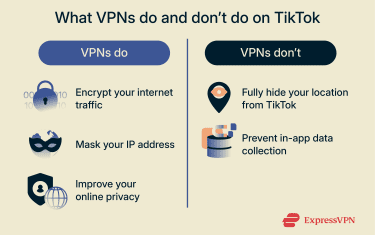
What you should know about VPN limitations on TikTok
VPNs can hide your IP address, but they don’t override all of TikTok’s location signals. The app blends GPS coordinates, device-level Wi-Fi-based location (controlled by OS permissions), and carrier information to determine where you are.
Additionally, a VPN doesn’t prevent in-app data collection or voluntarily given data (such as your phone number). It also can’t prevent TikTok from recognizing locations visible in photos you post or from sharing your data with its partners.
Managing and deleting your TikTok data
In many regions, laws like the EU’s General Data Protection Regulation (GDPR) or the California Consumer Privacy Act (CCPA) give you rights to access, correct, delete, or download your personal data. Under these laws, TikTok must explain how it uses your data and comply with these requests.
That said, TikTok requires certain data to operate its services. To fully delete your personal and location data from TikTok, you’ll need to delete your account.
FAQ: Common questions about TikTok location data
How does TikTok determine my location?
TikTok collects and analyzes key signals to determine your location. It does this through automatically collected information, such as your IP address, SIM card details, and (in some regions) your device’s location services. It can also use voluntarily provided details, including your tagged locations and language preferences.
Can I influence my TikTok feed using in-app settings?
Yes. TikTok provides an option to reset your For You page, and you can update your content preferences in your TikTok settings to reflect your current tastes. You can also report content that you find harmful or offensive. Reporting helps prevent that type of video from appearing in your feed again, and if it does break TikTok guidelines, it will help it get taken down.
What are safe and responsible ways to protect my privacy on TikTok?
You can protect your privacy on TikTok by setting your account to private so only approved followers can see your content, adjusting your ad preferences to limit personalized ads and data sharing, and being mindful of the personal information you share. You can also use a VPN to encrypt your connection and mask your IP address, which helps limit IP-based tracking.
Does TikTok have location settings in the app?
TikTok doesn’t have a single setting to fully control your location, but there are several ways you can manage how location influences your experience. You can control location permissions in TikTok settings and adjust your Nearby feed to see content from different regions where the feature is available. Setting your account to private also limits your content’s visibility in public location-based feeds, while clearing your location history and managing ad personalization settings can reduce how TikTok uses your location for recommendations and ads.
How do language and engagement settings affect my TikTok region?
Setting your preferred language signals the algorithm to prioritize videos in that language, while your engagement with location-specific content can signal that you’d like to see more content from a certain region. However, neither will impact the region TikTok understands you to be in, as this is based on signals like your IP address and SIM data, and in some locations, GPS and Wi-Fi.
Take the first step to protect yourself online. Try ExpressVPN risk-free.
Get ExpressVPN