Deep packet inspection (DPI): How it works and why it matters



Deep packet inspection (DPI) is embedded in specialized network devices and services, most commonly corporate firewalls, intrusion detection and prevention systems (IDPS), and sometimes within the infrastructure of internet service providers (ISPs). Its primary purpose is to give network operators better visibility and control.
DPI is used to look beyond basic data packet details to understand what a packet contains and how the connection behaves. In this guide, we’ll explain how that process works, where DPI appears, and what it means for traffic sent across different networks.
What is deep packet inspection (DPI)?
DPI is a way for a network to examine the data that gets sent and received in more detail. It can identify the application or protocol in use and check whether the traffic adheres to specific security or policy rules. You’ll often see DPI in enterprise firewalls or ISP traffic-management systems, where it helps filter data, detect potential risks, or manage different types of traffic.
DPI vs. conventional packet inspection
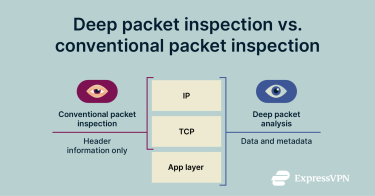 Packet inspection started as a straightforward process in which network tools simply looked at each packet's header. The header includes basic Internet Protocol (IP) and Transmission Control Protocol (TCP) information, such as the source and destination addresses and port numbers.
When applications used predictable ports and networks, this was enough; but as traffic became more complex, it didn’t offer the insights networks needed. Conventional inspection couldn’t see the data inside a packet or identify applications that used shared or dynamic ports. It also struggled to spot threats hiding in the packet’s contents.
DPI adds a deeper view. It looks at both the header and any visible parts of the payload, which helps the system understand the application in use and apply more specific checks. This is especially useful in environments where applications behave differently or where issues can hide inside traffic that otherwise looks normal; for example, when a connection stays open longer than expected or starts sending data at unusual intervals.
As hardware improved, DPI became practical at scale. It’s now built into many firewalls, intrusion detection systems (IDS), and other security systems, enabling them to examine traffic in detail with minimal impact on performance. This gives network administrators deeper visibility into how systems communicate while keeping everyday business operations running normally.
Types of DPI
DPI can work in several ways, depending on what the network needs to identify. Most systems combine multiple methods. The three most common types are:
- Statistical DPI: Statistical DPI analyzes how traffic behaves. It examines patterns such as packet size, timing, and flow to classify applications or highlight unusual activity. Because it focuses on behavior rather than content, it still works when the payload is encrypted.
- Stateful DPI: Stateful DPI reviews how packets relate to one another across a full session. It tracks the sequence of a connection and how it develops over time, which helps the system spot issues that only appear when you look at the entire flow rather than a single packet.
- Payload-based DPI: Examines the contents of a packet. It analyzes both protocol information and the payload to identify applications, apply policies, or detect threats hidden in the data. Although this method provides the most detail, the payload must be unencrypted; otherwise, the system can’t read it.
How does DPI work?
Most DPI systems follow the same steps. They read the packet header and payload, and analyze how the traffic behaves during the session.
Packet structure: Headers vs. payload
Every packet has two main parts: the header and the payload. The header contains essential routing details, such as source and destination addresses, protocol information, and other fields the network uses to move the packet to the right place. The header remains visible to the network, so each device along the path can read it and forward the packet to its destination.
The payload carries the actual data being sent. It might contain part of a web page, an email message, or a video stream. DPI examines both parts when the payload is visible (and thus unencrypted). Most modern encryption technologies, including virtual private network (VPN) protocols, encrypt this part of the packet, which limits how much of the payload DPI can see.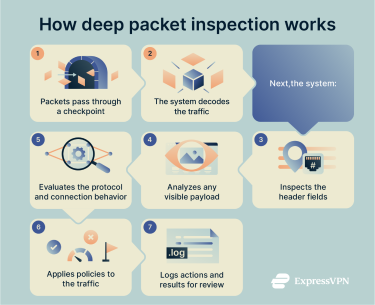
DPI process flow and data capture
DPI follows an established flow. It captures packets at a checkpoint, analyzes what it sees, and then applies the rules defined by the network's security or policy configuration.
1. Packets are captured at the checkpoint
The DPI system sits at a key point on the network, often inside a firewall or IDS. It captures packets as they pass through, allowing it to inspect both incoming and outgoing traffic in real time.
2. Packets get decoded
After capture, the system decodes each packet according to the relevant protocols, such as TCP/IP. If the traffic arrives in fragments, it reassembles those packets into the original stream or session so it can see the whole conversation, not just isolated pieces.
3. Header analysis
The DPI engine reads the packet header first. It checks fields such as source and destination addresses, port numbers, and protocol type. This step gives basic context about where the traffic is going and how it fits into existing connections.
4. Payload analysis (content inspection)
When the payload is visible, the system inspects the data inside the packet. It can look for application signatures, patterns, or keywords that relate to malware or policy violations.
In controlled corporate environments where the organization manages client devices, the network can be configured to decrypt Secure Sockets Layer (SSL) / Transport Layer Security (TLS) traffic for inspection. But without specific configuration on the devices, the payload can’t be decrypted; DPI can’t read it and relies on metadata or traffic patterns to understand what’s happening in the connection.
That said, even with HTTPS/TLS, there are elements of the traffic that aren’t encrypted by default. Exactly what is visible depends on the TLS version and whether features like Encrypted Client Hello (ECH) are in use.
5. Protocol and behavioral analysis
The system identifies which application or protocol the traffic uses, even if it doesn’t rely on standard ports. It can also watch how the connection behaves over time, looking for unusual patterns or deviations that might point to a potential problem you wouldn’t be able to identify from looking at a single packet.
Some DPI systems also combine statistical or behavioral analysis, which looks at traffic patterns across many flows to help classify applications or spot anomalies, even when the payload is encrypted.
6. Decision and policy enforcement
Based on the network traffic analysis, the DPI system applies the rules you’ve defined. It might allow the traffic, block it, send it for deeper inspection, or adjust its priority to manage bandwidth. Some setups also trigger alerts so administrators can review suspicious activity.
7. Logging and reporting
Finally, the system records details about the inspected traffic and any actions it took. These logs support monitoring, incident response, audits, and long-term analysis of network usage. Modern DPI systems are designed to perform these checks with minimal impact on network performance, so everyday traffic usually flows without noticeable delay.
Common tools and technologies for DPI
DPI systems are diverse, but they usually fall into one of two categories: open-source engines or commercial platforms. Open-source solutions are typically more flexible, allowing customization on how traffic gets inspected. This makes them useful for research, testing, and smaller deployments with less complex traffic.
Commercial DPI tools are generally better suited to large-scale deployments. They tend to focus on higher throughput and wide protocol support. They also often include built-in security features that help organizations deploy consistent security policies across the entire network. That said, some open-source tools can also achieve high performance in large environments, but commercial solutions are usually simpler to scale, integrate, and support in the long term.
Open-source DPI solutions
Examples of open-source packet inspection and monitoring tools include:
- nDPI: An open-source DPI library from the ntop community that focuses on protocol detection and traffic classification. It often integrates with monitoring tools such as ntopng.
- Zeek: A network analysis framework that includes DPI features. It can classify protocols, analyze full sessions, and monitor activity across a connection.
- Suricata: Open-source IDS and intrusion prevention systems (IPS) that use DPI techniques to inspect visible packet contents, apply signatures, and detect suspicious traffic patterns.
Enterprise and commercial DPI tools
Examples of enterprise and commercial packet inspection and monitoring tools include:
- Cisco: Cisco includes DPI capabilities in several of its security and networking products. These systems can classify applications, inspect the contents of visible packets, and apply network policies based on what the traffic contains or how it behaves.
- Palo Alto Networks: It integrates DPI into its next-generation firewalls to identify applications, analyze connection behavior, and enforce security rules across different types of traffic.
- Fortinet: Fortinet uses DPI within its security platforms to examine packet headers and payloads, detect known patterns or signatures, and help organizations apply consistent policy controls at scale.
Applications of DPI
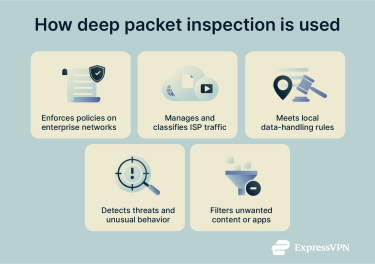 DPI is commonly used to enhance network security, but it also has many other use cases, including bandwidth management, content filtering, and network surveillance.
Enterprise network security
In business networks, DPI gives you a clearer view of the traffic moving through your network. It identifies which applications are active by examining protocol behavior and metadata, and it checks whether the data being transferred aligns with the policies you’ve set, such as approved services, allowed file types, or expected destinations.
You can also use DPI to monitor how people access sensitive parts of the network, such as customer databases or financial data. It can correlate traffic flows with user identities, devices, and access rules, making it easier to spot unusual activity patterns or policy mismatches. This helps keep internal systems running as expected and ensures that controls remain consistent across different teams and devices.
It also helps you check that internal systems communicate as expected and flags traffic that doesn’t follow your usual access rules. For example, it can alert you if an unauthorized device tries to access part of your network. This makes it easier to manage large environments and reduce potential security issues because DPI applies these checks from a central point.
ISP traffic management
ISPs often use DPI to understand how different types of traffic move across their networks. This helps them see which applications are active and how much bandwidth they use, which is useful when balancing demand during busy periods.
ISPs may use this information to differentiate traffic types and manage network resources accordingly. They can recognize when traffic belongs to a video call, an online game, or a large download, even if those applications use the same ports. They can then prioritize time-sensitive traffic (such as calls or interactive apps) to keep it stable during busy periods, while placing less urgent traffic in a lower queue. This helps the network stay responsive when several people are online.
However, this type of analysis might intersect with the broader issue of "net neutrality", a principle that proposes ISPs should treat all lawful internet traffic equally. In 2024, the Federal Communications Commission (FCC) voted to restore net-neutrality rules. But in early 2025, an appeals court determined that the FCC lacked statutory authority to implement those rules. The decision prevented the 2024 order from taking effect, leaving federal net-neutrality rules unchanged.
Fortunately, a VPN changes this picture somewhat. Because VPNs encrypt traffic, the ISP can still see that data is flowing, but can’t reliably determine which application generated it or what type of content it carries. This makes certain forms of application-specific throttling harder to apply. However, ISPs can still manage connections based on unencrypted information, such as overall bandwidth usage, connection timing, and the VPN server's destination IP address.
Government surveillance and regulation
Some countries have laws requiring network operators to follow specific data-access or reporting processes. In these situations, DPI may be one of the tools used to help meet those obligations. Governments may also establish specific requirements under which DPI is used to apply the necessary controls.
Threat detection and intrusion prevention
DPI helps identify issues that basic inspection might miss. Instead of collecting raw traffic through packet sniffing (which simply captures packets as they pass over the network), it examines the visible parts of each packet and how the connection behaves over time. For encrypted traffic, DPI can’t see the payload directly, but it can still analyze metadata, flow patterns, and behavior to understand what’s happening. This gives a clearer sense of which application is in use and whether the traffic fits standard patterns.
In addition to behavioral insights, inspection engines can highlight sessions that look unusual or payloads that resemble known threats. When an alert is triggered, IDS or IPS tools use this information to determine what to block, what to allow, and when to generate notifications. The IDS typically generates alerts, while the IPS can actively block or throttle traffic to stop threats. This enables quick responses and keeps minor problems from affecting more of the network.
Network data filtering and shaping
DPI can also help control the types of content that move across a network. It identifies traffic that matches specific categories or services and checks whether it meets the rules set; for example, filtering out unwanted file types, blocking specific applications, or limiting access to sites that aren’t appropriate for the environment.
Because DPI can see more detail than basic filtering, it can apply these controls with greater accuracy. It helps keep the network focused on trusted tools and services, and it gives a clearer view of how people use shared resources. This makes it easier to maintain a consistent experience for everyone on the network.
Advantages and drawbacks of DPI
DPI is helpful in many network environments, especially for security and performance monitoring, but it also has drawbacks.
Advantages of DPI
- Stronger threat detection: DPI gives security tools more detail about how each connection behaves. It provides access to visible packet contents and session-level patterns to help identify signs of malware, unexpected payloads, or traffic that doesn’t match the network's normal baseline.
- Better visibility into applications: Many applications no longer rely on predictable ports or fixed patterns. DPI can identify them by looking at protocol behavior or recognizable features in their traffic. This helps define which tools people use on the network and whether they fit with established policies.
- Improved performance monitoring: DPI can show which applications consume the most bandwidth and how they affect overall network traffic. When an issue arises, it's easier to see whether the slowdown comes from a specific service, a device, or a spike in demand.
- More accurate traffic controls: Because DPI understands more about what each packet contains, it can apply controls more precisely than basic filtering. Network operators can prioritize time-sensitive applications, limit non-essential traffic during peak hours, or block specific categories when needed.
- Centralized policy enforcement: DPI often runs at a key network checkpoint, enabling policies to be applied consistently from a central location. This helps maintain predictable access and reduces the likelihood that devices will bypass established controls.
Disadvantages of DPI
- Reduced visibility on encrypted traffic: DPI can only inspect data that’s visible to the system. Encrypted traffic limits what DPI can see, for example, when it travels inside an OpenVPN tunnel. When the payload isn’t visible, the system relies on metadata and traffic patterns instead of content.
- Higher resource use: Inspecting packet contents takes processing power. If the system handles large volumes of traffic, DPI can increase latency or reduce throughput unless the hardware is sized appropriately, which can make connections more sluggish.
- Privacy considerations: DPI can reveal details about the applications people use and how they interact with the network. Organizations need clear guidelines for how this information is handled, who can access it, and how long it’s stored. In cloud environments, these policies become even more important because multiple teams or services may share the same infrastructure.
- Legal and compliance requirements: Some countries set rules for how network traffic can be inspected or what information it can collect, such as the General Data Protection Regulation (GDPR) in the EU. If DPI is employed in one of these regions, it must be ensured that the system aligns with local regulations and follows the requirements for handling or protecting user data.
- Ongoing maintenance: DPI relies on updated rule sets and accurate signatures to stay effective. Without regular maintenance, it may miss relevant issues or generate alerts that don’t reflect real problems. This adds long-term overhead, especially in networks that change frequently.
- Content restrictions: Because DPI can identify specific applications, domains, or traffic types, it may be used in environments where operators apply strict controls.
How to implement DPI in your network
If you’re thinking of implementing DPI, there are a few important factors to consider.
Integration with firewalls and IDS/IPS
Many firewalls and IDS/IPS tools already include DPI, so adding it to your network usually means enabling built-in features. A firewall can use DPI to identify the application behind a connection and apply more specific rules. For example, it can identify traffic as belonging to a video call rather than a large file download, even if they use the same port.
IDS and IPS tools build on this inspection to help you detect suspicious patterns. They use the extra detail from DPI to spot traffic that doesn’t behave as it should, enabling them to raise alerts or block activity that appears unsafe.
In most setups, you place a DPI-enabled firewall at the edge of your network or at another key checkpoint. IDS or IPS tools can sit in line with that traffic or monitor a copy of it, depending on how you design your network. This gives a clearer view of what’s happening across each connection and helps security tools make more informed decisions without adding extra complexity.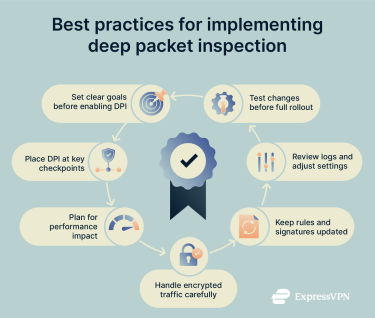
Configuration best practices
Setting up DPI works best when you start with a clear plan and make small, measured changes. Here are some best practices to keep in mind:
- Start with clear goals: Decide what you want DPI to support, whether that’s security, performance monitoring, policy enforcement, or a mix of these. That way, you have clear objectives from the start.
- Choose the correct placement: You don’t need DPI on every segment. Begin with key checkpoints, such as your internet edge or internal zones that handle sensitive systems, and expand from there as needed.
- Performance planning: Inspecting packet contents takes processing power, so make sure your firewall or system has enough capacity to handle your traffic without creating delays.
- Handle encrypted traffic carefully: Decide where decryption makes sense and where it doesn’t. Some systems may require exceptions, especially if they use pinned certificates or strict security settings. With certificate pinning, an application is hard-coded to trust only a specific certificate, so it blocks traffic if it detects anything else.
- Keep rules and signatures up to date: DPI relies on accurate definitions to understand applications and spot potential issues. Be sure to update regularly to keep things working smoothly and reduce false positives.
- Monitor logs and adjust as needed: Review DPI activity logs to fine-tune your configuration, address problems early, and understand how inspection affects performance.
- Test changes before rolling them out widely: New rules or deeper inspection levels can affect how specific applications work, so do a trial run first to catch issues early and avoid disruptions.
Real-world case studies of DPI deployment
DPI is widely used across many industries. Although each sector might deploy DPI in slightly different ways, the goal is the same: to get a clearer view of how systems communicate and identify when something appears out of place.
In healthcare and finance, for example, DPI helps organizations keep sensitive data on approved paths and monitor systems that handle regulated information. Retail networks, on the other hand, use it to protect payment traffic and monitor applications that support point-of-sale systems.
DPI also plays a practical role in Internet of Things (IoT) deployments. Smart factories use it to watch machine-to-machine traffic and spot devices that behave in unexpected ways. Connected vehicles and smart city systems rely on it to identify unusual data patterns or detect when a sensor starts sending traffic it shouldn’t. In critical infrastructure, DPI helps ensure that operational systems communicate only with the services they’re meant to use.
FAQ: Common questions about DPI
Is deep packet inspection (DPI) legal?
Yes, DPI is legal in many areas, but rules differ by country. Some privacy laws, such as the EU’s General Data Protection Regulation (GDPR), limit how organizations can inspect or store data, which affects how DPI is used. Before deploying DPI, always check the regulations in your jurisdiction.
What’s the difference between deep packet inspection (DPI) and a firewall?
A firewall controls which traffic can enter or leave a network, usually based on IP addresses, ports, or protocols. DPI looks deeper into the traffic itself and examines visible packet contents or behavior. Many modern firewalls include DPI to apply more specific rules, but the firewall still handles the overall access control.
Can deep packet inspection (DPI) detect VPNs?
In some instances, DPI may detect a VPN connection in use because encrypted tunnels exhibit recognizable patterns. Although DPI could identify that you’re using a VPN, it can’t see the data inside the encrypted tunnel unless the network decrypts the traffic. This means that DPI can’t inspect the payload, because the VPN hides it.
What are the limitations of deep packet inspection (DPI)?
The main limitation of DPI is that it can only inspect the parts of a packet that are visible. If traffic is encrypted, such as when using a VPN, DPI can’t inspect it as the payload is inaccessible and must rely on metadata and traffic patterns instead of full packet details. DPI also requires significant processing power to analyze each flow, which can affect performance on busy networks.
Accuracy is another limitation: Some applications use encryption, obfuscation, or shared ports, which can make protocol or application identification less reliable. As with any data management tool, organizations must also consider privacy and compliance regulations, since DPI can reveal details about people on the network.
Does deep packet inspection (DPI) affect internet speed?
DPI can affect performance if the system has to process more traffic than it’s designed to handle. Most networks manage this by adjusting how much data they inspect or by using hardware that supports higher throughput.
Take the first step to protect yourself online. Try ExpressVPN risk-free.
Get ExpressVPN